Image to layers / Canva alternative
Canva Magic Layers alternative
Canva Magic Layers or Aixio Layer v2? Choose by the file you need next
Both products turn a flat image into editable material. The useful question is not which one says ‘layers,’ but which returned file survives your next rewrite, object move, background check, and handoff.
2026-10-17
What you need to know
Choose Canva Magic Layers when the recovered design must stay in Canva. Choose Aixio Layer v2 when you need a native PowerPoint with editable text, shapes, image layers, and a reconstructed background. In Aixio's published 150-design benchmark, Layer v2 returned 8,096 valid editable layers versus 3,871 from Canva Magic Layers; treat that as Aixio-reported evidence and still test your own files.
| Canva | Editor-native | Layer recovery inside Canva |
| Aixio | Native PPTX | Layer v2 in Studio |
| Decide by | Destination | Where the recovered design must go next |
What the 150-design benchmark measured
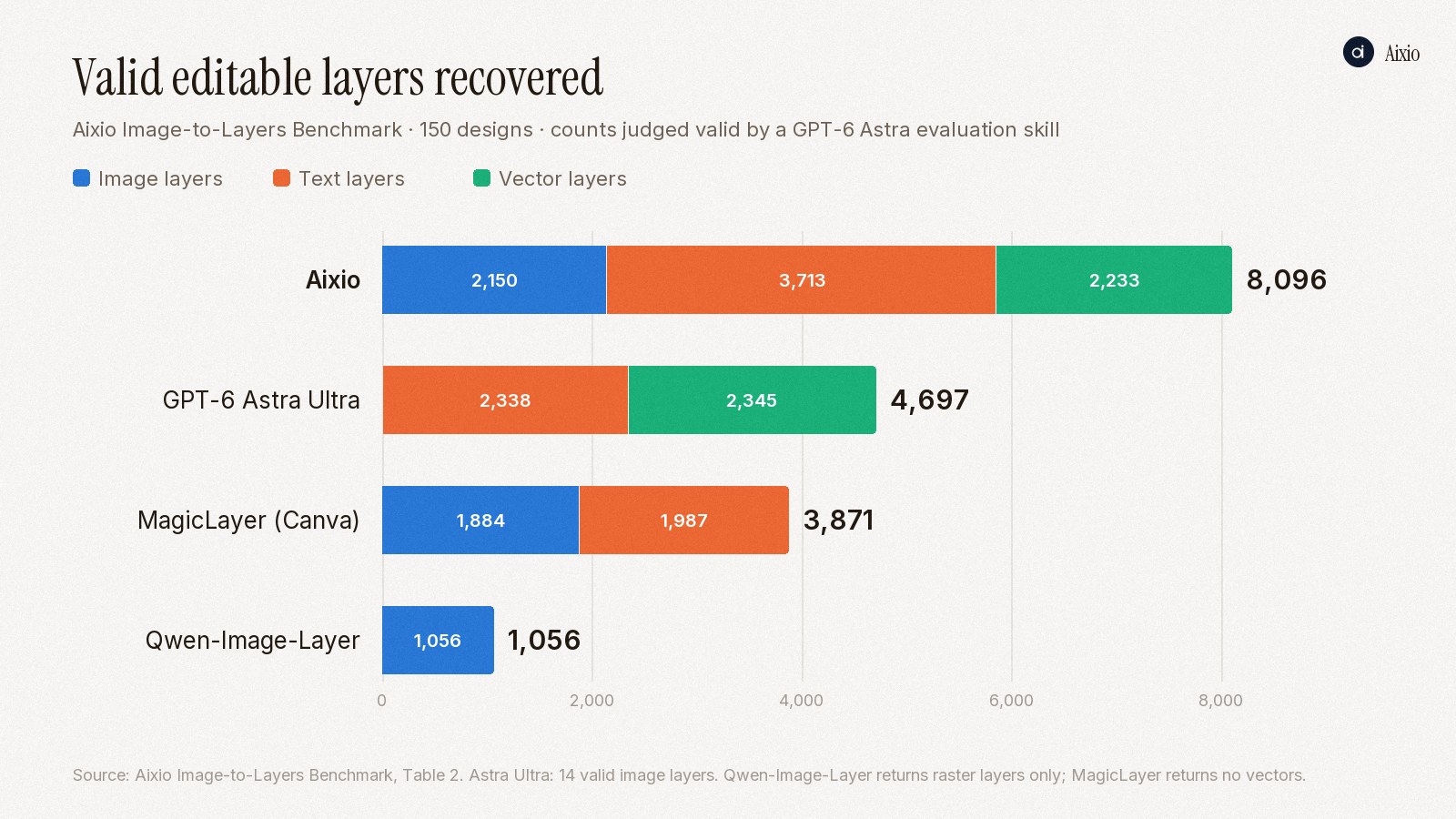
Aixio's published benchmark gave both products the same 150 posters, slides, infographics, social graphics, product pages, and interfaces. It counted an element only when it returned as usable image content, matching editable text, or a matching native vector. Layer v2 returned 2,150 valid image layers, 3,713 text layers, and 2,233 vector layers; Canva Magic Layers returned 1,884 image layers, 1,987 text layers, and no native vectors in the exported files counted by this test.
- Reported total: 8,096 valid layers for Aixio Layer v2 and 3,871 for Canva Magic Layers
- Reported reconstruction score: LPIPS 0.1382 for Aixio and 0.1414 for Canva; lower is better
- Evidence boundary: Aixio ran and published the benchmark, the public repository does not include the raw dataset, and Canva's hosted runtime was not timed
Run the same four-edit acceptance test
A larger layer count is useful only when the parts remain meaningful. Use one text-heavy design and one design with overlapping objects. In each result, rewrite the longest line, move the largest foreground object, hide the foreground to inspect the recovered background, and export the required handoff. Record incorrect copy, fused objects, missing shapes, broken fills, and the manual cleanup time before choosing.
Formats, access, and costs to verify
Canva says Magic Layers is a premium AI tool, recommends JPEG or PNG, and counts each use against the plan's shared monthly AI allowance. Aixio Layer v2 accepts PNG, JPEG, and WebP in Studio; the current public reference lists one credit per converted page, but the product quote and current API catalog are authoritative. Availability, allowances, and pricing can change, so check both products at the time of your test.
From flat file to next edit
- Choose a source that represents your real production work.
- Run the unchanged source through both workflows.
- Move an object, rewrite text, hide the foreground, and export.
- Choose the environment that leaves the least manual work before delivery.
Common questions, answered plainly
Is Aixio Layer v2 the same as Canva Magic Layers?
No. They pursue the same flat-image-to-editable-design job but return into different workflows: Canva's editor or Aixio Studio with a native PowerPoint handoff.
Which supports WebP?
Aixio Layer v2 currently accepts PNG, JPEG, and WebP. Canva's Magic Layers page recommends JPEG and PNG.
Did Aixio Layer v2 beat Canva Magic Layers in the published benchmark?
In Aixio's own 150-design benchmark, Layer v2 returned 8,096 valid editable layers and Canva Magic Layers returned 3,871. The test used the same designs, but it was run and published by Aixio and the raw dataset is not in the public repository, so reproduce the four-edit test on your own sources.
Which should I choose?
Choose Canva for a Canva-native editing and publishing workflow. Choose Aixio when you need editable text, native shapes, separate images, and a reconstructed background in a PowerPoint handoff or inside Studio. In either case, choose the result with less manual cleanup on your own designs.