Editable AI Motion Graphics: Two Tested Workflows
Build, inspect and download a Canvas loop and an interactive SVG explainer.
Published · Aixio
The practical way to make editable AI motion graphics is to ask for a small browser project rather than a flattened clip. In two separate Aixio Website workspaces, we built an ambient Canvas/Web Audio loop and an interactive SVG lesson, inspected exact timeline frames on desktop and mobile, and exported the source. Both runnable ZIPs are below.
Why make motion in browser source?
A rendered video is convenient to post, but changing its copy, timing, curve or layout usually means regenerating it. A browser-native animation keeps those decisions in HTML, CSS and JavaScript. An editor can revise the files, a developer can inspect the timeline, and a presenter can keep interaction live.
The reusable production contract was simple: original inputs, locked copy, a named duration, playback controls, a hardest frame, deterministic seek(seconds) review, offline operation and a source-ZIP handoff. Aixio kept each brief, its working files and its Website preview together. Another coding workspace could implement the same pattern; the tested advantage here is the persisted build-and-review workflow, not an exclusive renderer.
Workflow 1: Tideglass ambient loop
Audience and job. A social or sound editor needs a 24-second square visual bed with an original procedural soundtrack.
Input preparation. We wrote the fictional Tideglass name, four movement labels and a four-color palette. There was no reference image or third-party audio. Canvas2D suited the continuous generative material; Web Audio kept the soundtrack editable and avoided an external sample license.
Prompt and execution. The initial brief specified a 1080-square loop, exact 24-second timeline, reduced-motion behavior, visible controls, offline operation and window.motionReview.seek(seconds). The agent incorrectly started an image-generation tool, so we stopped the turn and used the package's one correction: code only, no media or search tools, and exactly index.html, styles.css, script.js and README.md.
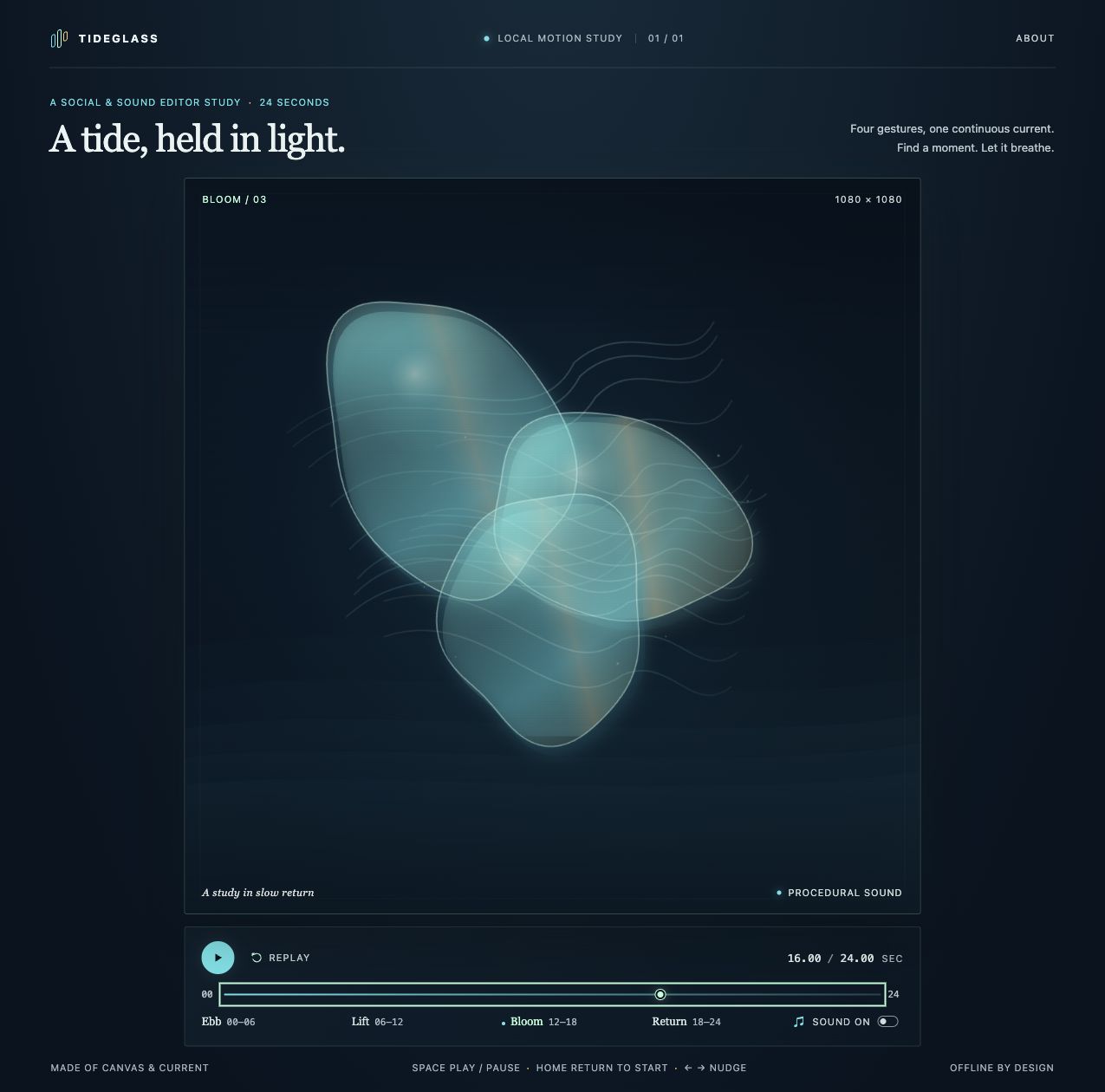
Acceptance and handoff. The unchanged export rendered at exactly 16.00 seconds with BLOOM / 03 visible and no browser warning or error. At 390×844, the document width matched the viewport and the canvas stayed inside it. The deliverable is a runnable offline project with source, review controls, procedural audio and recording notes.
Download the Tideglass source ZIP. Its SHA-256 is listed in the download checksum manifest.
Limits. We did not capture audio levels, compare the loop seam pixel by pixel, force reduced-motion emulation or export video. Aixio's assembled about:srcdoc preview also ran the external deferred script before its DOM targets existed. The exported files worked when served unchanged; the embedded-preview defect remains unsolved.
Workflow 2: interactive cubic Bézier explainer
Audience and job. An educator or developer advocate needs an interactive explanation that works in a talk, an article and a mobile link.
Input preparation. We supplied an original five-part lesson outline and the standard cubic Bézier formula. SVG and DOM elements were more appropriate than Canvas because the points, labels, focus states, dragging and responsive text needed to remain addressable and editable.
Prompt and execution. A separate fresh Website workspace received a code-only brief for a 35-second lesson with draggable control points, keyboard adjustment, visible construction lines, a tangent stage, responsive layout and the same deterministic review API. It produced index.html, styles.css, app.js and README.md in one turn.
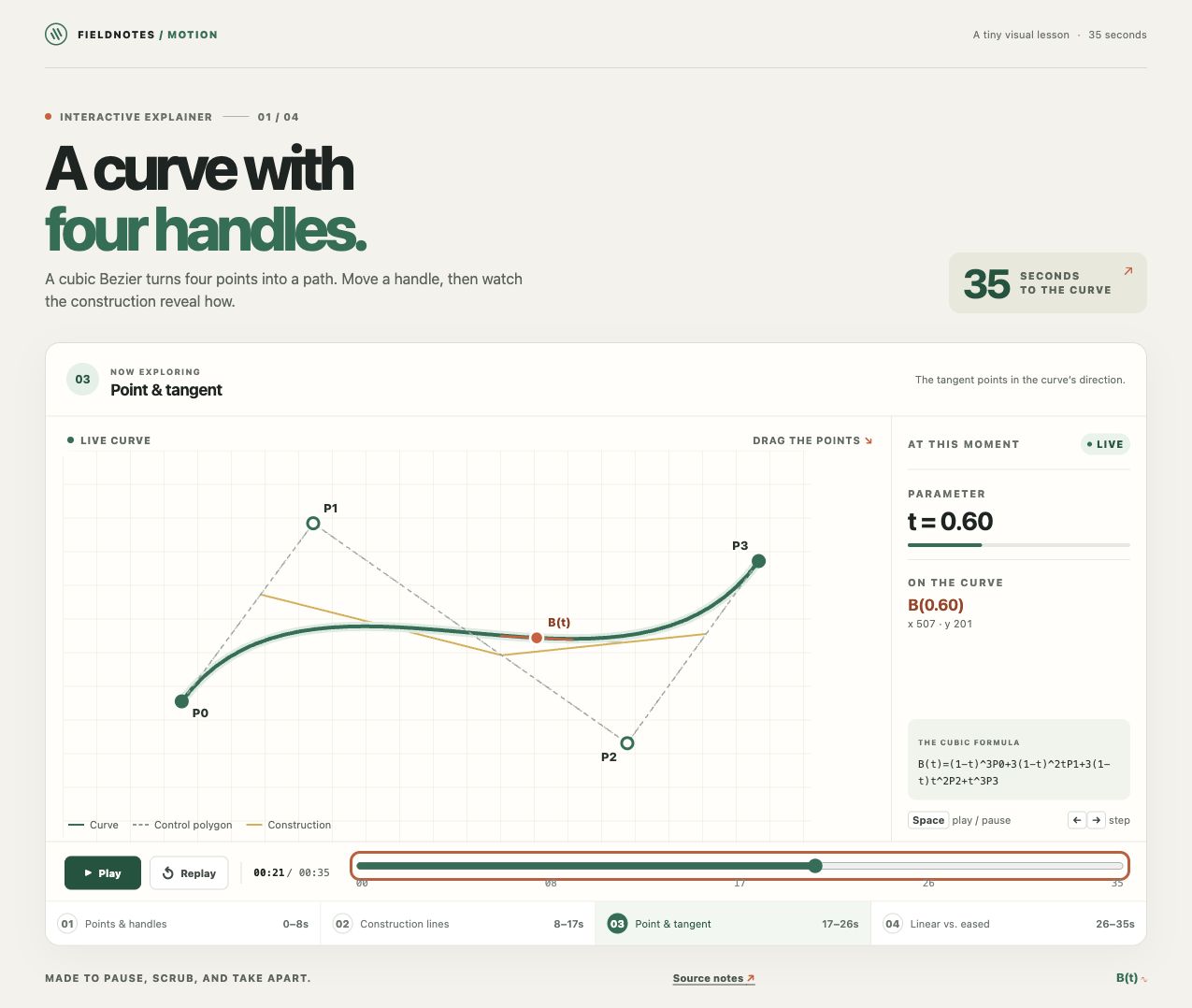
Acceptance and handoff. The unchanged export rendered at exactly 21.00 seconds with the construction, tangent, t = 0.60, B(0.60), coordinates and formula visible. There were no browser warnings or errors. At 390×844, both the formula box and SVG stayed inside the viewport. The result is a responsive offline lesson with editable SVG source, deterministic timeline and speaker-friendly controls.
Download the Bézier source ZIP. Its SHA-256 is listed in the download checksum manifest.
Limits. We did not exercise a real pointer drag, keyboard point adjustment, forced reduced-motion emulation or video export. The same assembled-preview ordering defect appeared, while the unchanged exported source rendered normally.
What changed, and what transferred
The renderer changed with the job: Canvas plus Web Audio for ambient material, SVG plus DOM for an accessible explainer. The duration, aspect ratio, hardest frame and inspection criteria also changed.
The reusable part was the production contract: prepare original assets, lock copy and duration, expose a pure time control, name one difficult frame, repeat-seek it, inspect desktop and mobile, then hand off the source ZIP. The method transferred across two materially different briefs. It does not establish model-wide reliability, one-click batching or a public saved Skill.
Cost, failure and honest scope
Tideglass cost 0.9805 credits across the stopped attempt and correction. Bézier cost 29.4821 credits. The UI showed 28.4688 credits when the second turn completed, then delayed settlements raised the final package total to 30.4626—0.4626 above the authorized 30-credit cap. No further paid turn was started.
This is a tested manual recipe, not a saved Aixio Skill or automatic pipeline. The original plan included a third responsive launch story, but it was not submitted after the cap was consumed. The two downloadable projects are real; there is no hidden third output or finished video.
Reuse the exact recipe
- Define the audience, finished use, duration, aspect ratio and locked copy before opening the workspace.
- Choose Canvas for continuous material, SVG/DOM for editable labeled geometry, or CSS/DOM for layout-heavy motion.
- Require offline files, visible playback controls, reduced-motion behavior and
window.motionReview.seek(seconds). - Name a difficult review time and the exact elements that must be visible there.
- Serve the exported files unchanged. Seek the difficult frame from a cold load and again after another timestamp.
- Check desktop and 390px mobile width, then export the source ZIP before recording or downstream editing.
Open the exact prompts and settings · Download the workflow recipe · Start a Website project in Aixio
For another evidence-led motion workflow, compare our single-image camera-orbit experiment.
Sources
The high-attention inspiration was the creator's Riso Window Seat repository, including its film notes and tool contract. We adapted the deterministic-review technique, not its composition, branding or unavailable original prompt. Bang Motion independently recommends style briefs, short copy and keyframe review; its Skill was not installed or tested in Aixio. Accessibility choices follow W3C animation guidance and reduced-motion technique C39.
Questions
Can I export these AI motion graphics as video?
The completed projects are editable browser artifacts first. Screen recording or a Canvas stream can be a downstream step, but neither video path was tested here and it does not replace the source ZIP.
Why not use one long cinematic prompt?
The brief locks the job, timeline, hardest frame, controls and handoff before code. That makes defects observable and corrections specific instead of relying on a pleasing full-speed impression.
Is this an Aixio Skill?
No. This is a two-project manual recipe. No saved Skill or automatic pipeline was used, so the article does not claim one-click reuse.