Can you turn an AI-generated slide image into editable PowerPoint?
Check the objects, not just the file extension
Published · Aixio
Yes. A slide image can be reconstructed into editable PowerPoint content, but a PPTX file can also contain only one large picture. To revise a headline, recolour a shape or move a photo independently, those parts need to exist as separate objects.
Aixio Layer v2 can recover text boxes, native shapes and separate images, with background reconstruction where possible. A flat image does not preserve the original source objects or hidden pixels, so review the recovered file before delivery.
Start with the edit you need
Write down the changes that would make the slide useful: change a date, remove an offer badge, move a product photo or make room for longer copy. Judge the result against those requirements rather than its preview alone.
An image on a slide preserves its appearance as a picture. A reconstructed slide attempts to recover components. Some may become text or shapes; others remain raster images. Also distinguish shapes from charts: movable bars do not establish that the file contains the original chart data or formulas.
Use Edit Layers in Aixio Studio
- Open Studio and upload a PNG, JPEG or WebP.
- Select the image and choose Edit Layers.
- Review the result or download its PowerPoint file.
- Open the export in the recipient’s PowerPoint setup and test the edits you need.
Start with one representative slide before converting a larger set. Consult the current product reference for workflow and availability.
An existing Layer v2 example
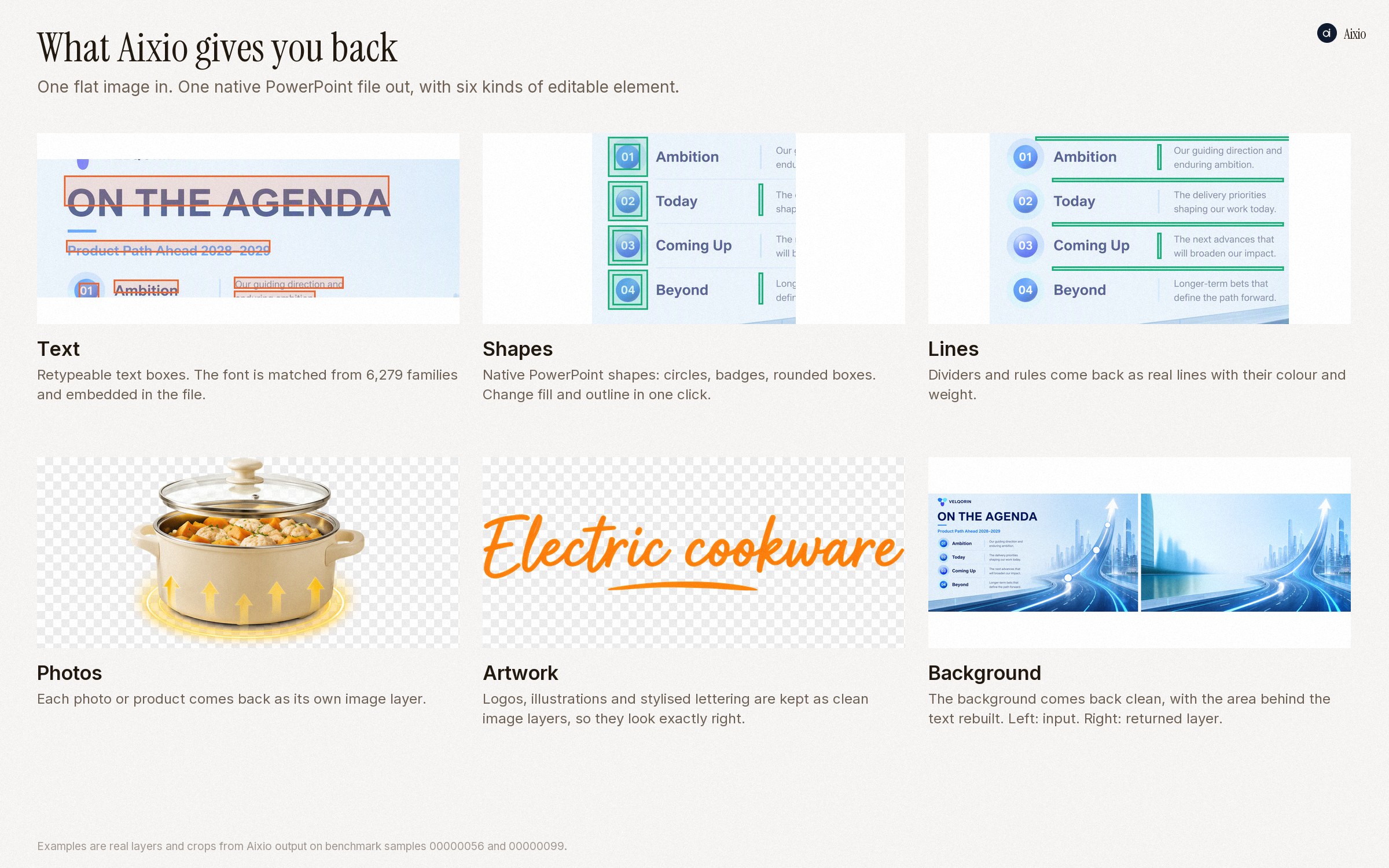
This previously published Aixio panel shows crops and layers from benchmark samples 00000056 and 00000099. It illustrates the types of output to inspect; it is not a new hands-on test or a downloadable editable slide. See the public examples and methodology. The evaluation is vendor-reported, not independent verification of your file.
Five checks before handoff
- Text: rewrite a sentence; check spelling, font substitution and line breaks.
- Shapes: change a fill or outline and confirm the intended object changes.
- Images: move a photo independently and inspect its edges.
- Background: remove an element and inspect the area underneath. Reconstructed pixels are inferred.
- Handoff: save, close and reopen the export; check object order, cropping and layout in the destination app.
When to rebuild manually
Use source data for updateable charts. Rebuild specialist typography or technical diagrams when accuracy cannot be verified from the image. Keep the original working file when available: recovery reconstructs visible content rather than restoring all source information.
Common questions
Does PPTX guarantee editable text?
No. Select the headline and try changing its wording. The filename alone does not tell you what is editable.
Should I convert the whole deck first?
Test a representative slide and check the edits that matter before committing to a larger conversion.
Choose a slide you own and try Aixio Studio, or read the image-to-layers guide for more about recovery.