AI Image Editing Without Changing the Rest: 3 Production-Safe Workflows
Three real Aixio edits, whole-frame acceptance tests and honest manual finishes for outputs that drifted.
Published · Updated · Aixio
If you want AI image editing without changing the rest of the picture, treat generation as one stage of a production handoff—not the finish line. Lock the source, name every immutable element, make one bounded change, inspect the whole frame, and repair from the locked source when the model drifts.
We executed that workflow on three materially different jobs in Aixio: a crushed-package replacement, a watch placement and a text-rich poster removal. One model output passed its practical rubric. Two were rejected, then finished manually from the original vectors. The useful result is three delivery-ready handoffs, the genuine Studio attempts, and a reusable decision rule for when to accept, correct or composite.
The finished handoffs first
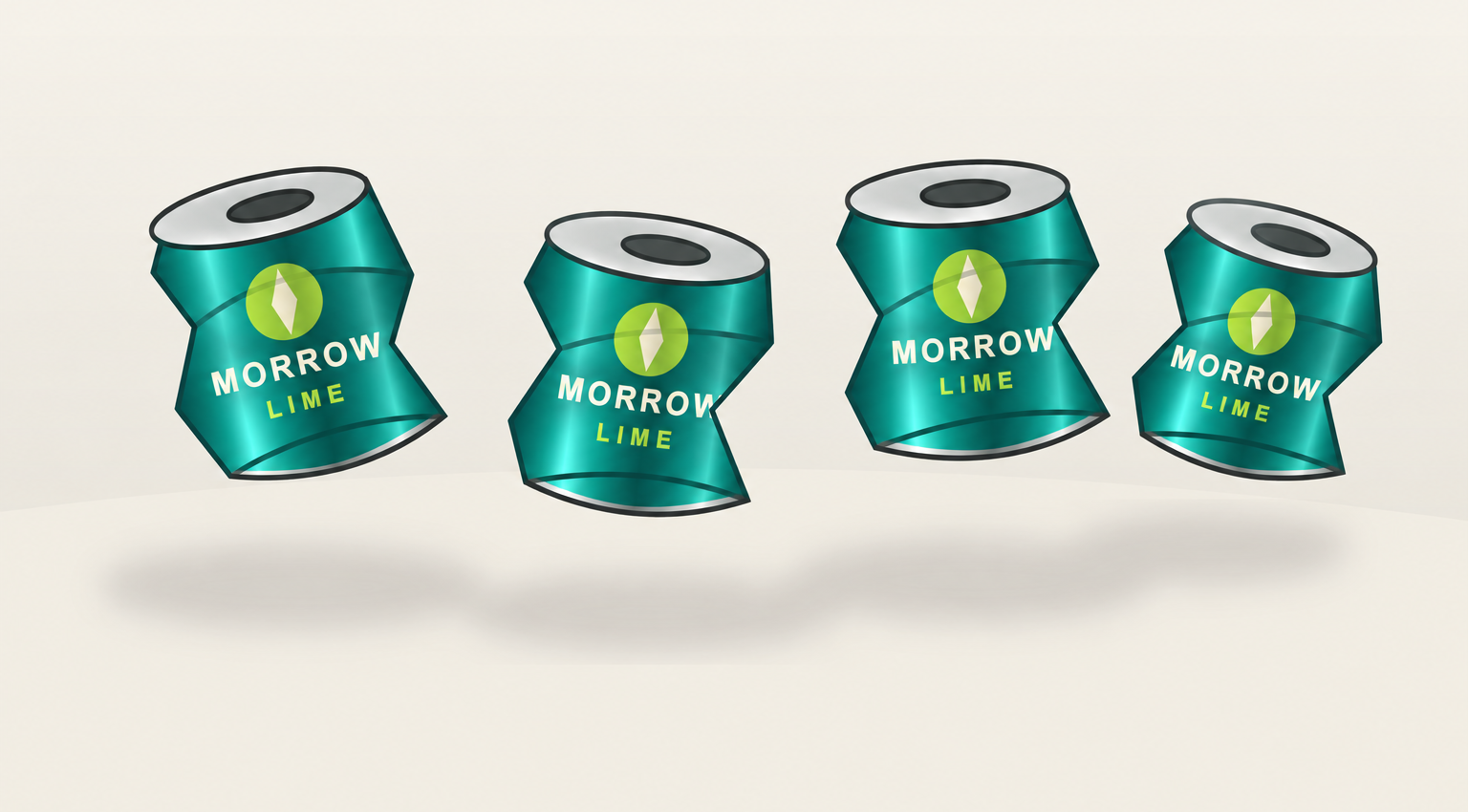
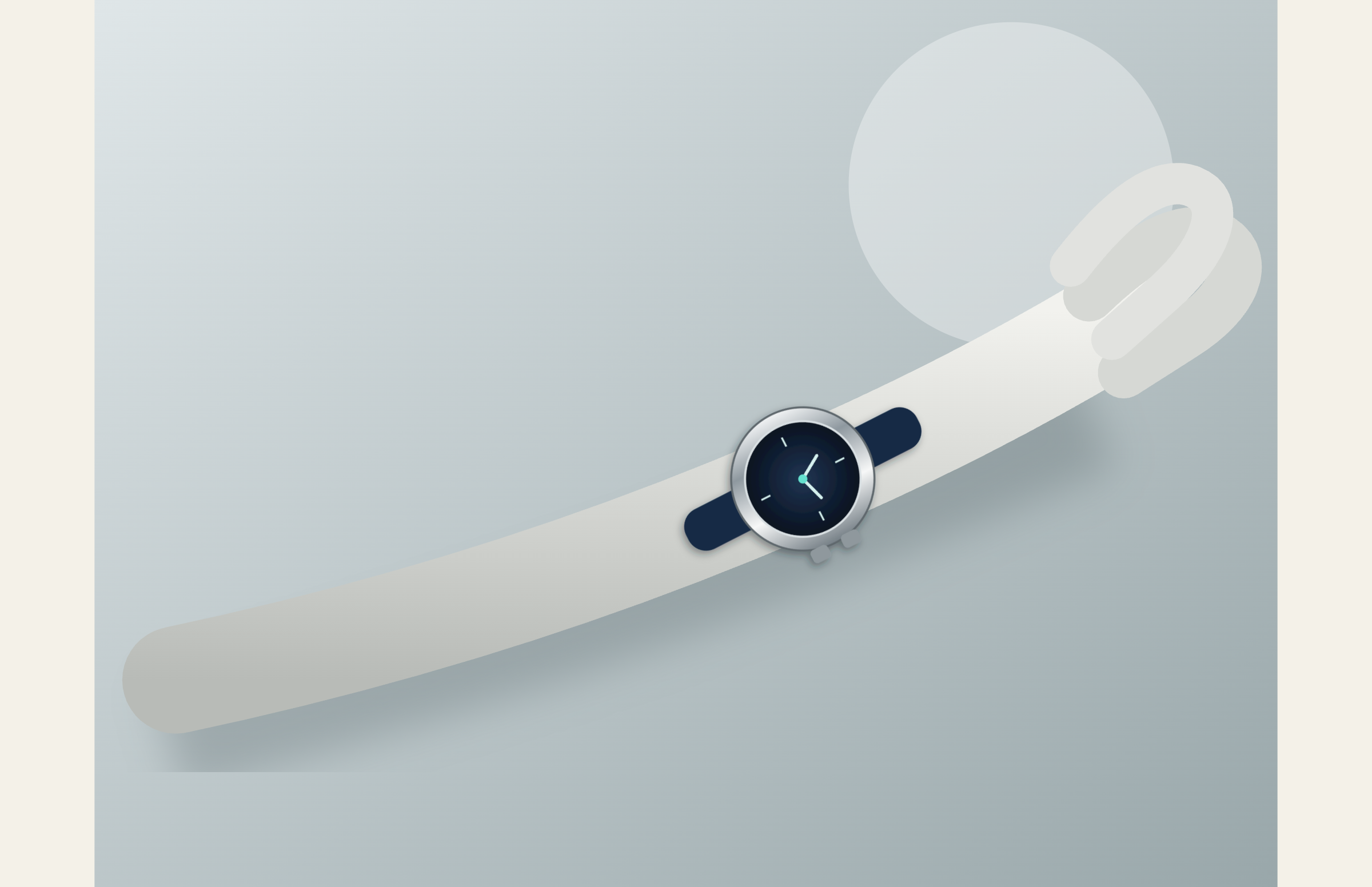
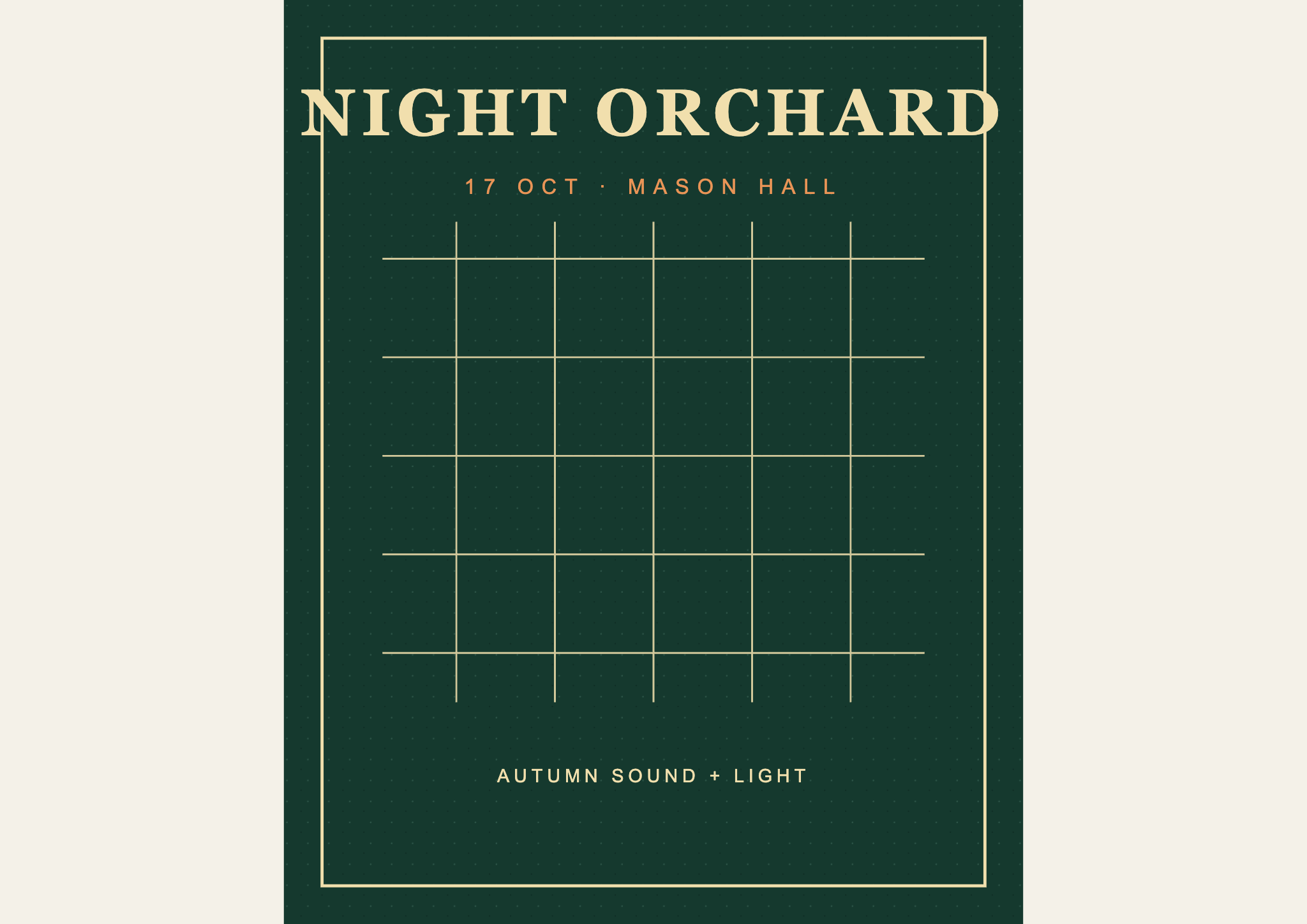
These are the files a reviewer would receive. The Morrow image is the accepted Aixio output with only the instructional header cropped away. Northline and Night Orchard are deterministic manual finishes from the locked source vectors after the model attempts failed. They are labeled as manual work and do not replace the recorded outputs.
Why this matters now
A high-attention September 2026 creator post showed Qwen Image 2.1 replacing crushed cans and placing a watch while trying to preserve pose, lighting and reflections. When retrieved on October 7, it showed about 840 net votes and 103 cached comments; no view or follower denominator was available, so the signal is directional. The comments were more useful than the showcase: people reported pixel drift, wrong scale and camera, broken small text, changed colors and failed pose preservation.
That maps to a common production job: change one thing in an image without redesigning everything else. This update replaces broad claims on our existing advanced-techniques URL with actual inputs, outputs and rejection criteria. The page had 52 same-day Search Console impressions, zero clicks and average position 5.6; those numbers informed the framing but do not prove demand or future performance.
The source model is not available in Aixio. We recreated the underlying preservation problem with original fictional assets and three currently selectable models. We did not copy the creator's brands, composition or identity.
The preservation-first workflow
- Put the image to preserve first and the reference or localization guide second.
- State each image's role. A reference supplies product identity; it does not replace the canvas.
- List immutable geometry, camera, crop, lighting, background, copy and object count.
- Describe one change and forbid plausible extras.
- Inspect object count, scale, geometry, typography, crop and unrelated areas—not just the target.
- Reject drift explicitly. A prettier result is not a successful edit when it changes the job.
- If the job requires exact identity or typography, return to the locked source and finish with a layer, mask or vector edit. Preserve the rejected model output as evidence.
After the first case, we saved this as a private Aixio Skill named Preservation-first image edit audit. It stayed attached to Cases 2 and 3 while their prompts, reference images and models changed. That proves saved-Skill reuse across two briefs. It does not prove automation, one-click reliability or public availability.
Download the exact prompts and settings · Download the audit recipe · Download the complete evidence pack
Case 1 — replace packaging while preserving crushed geometry
Audience and job. An ecommerce designer has an approved composition of four crushed cans and needs a fictional Morrow Lime identity applied without rebuilding the folds, positions or reflections.
Input preparation. We authored a 1600×1067 scene with four distinct crushed silhouettes and a separate 1200-square fictional package reference. A full-image reference edit was more appropriate than a mask because the teal/lime color and reflected light needed to follow each existing fold.
Model and settings. GPT-Image-2.5 Sunburst; Auto size; Auto quality; PNG; one output. The final quoted cost was 3.51 credits and the settled charge was 3.514.
Exact prompt. “Use image 1 as the composition and geometry source and image 2 only as the fictional package identity. Replace every PLAIN can in image 1 with the MORROW LIME can from image 2. Preserve exactly four cans, each crushed silhouette, fold, position, rotation, scale, camera, crop, white sweep and existing shadow. Transfer the teal/lime colors into the can surfaces and their existing reflections. Keep MORROW and LIME readable while allowing the label to deform naturally with each fold. Change nothing else.”
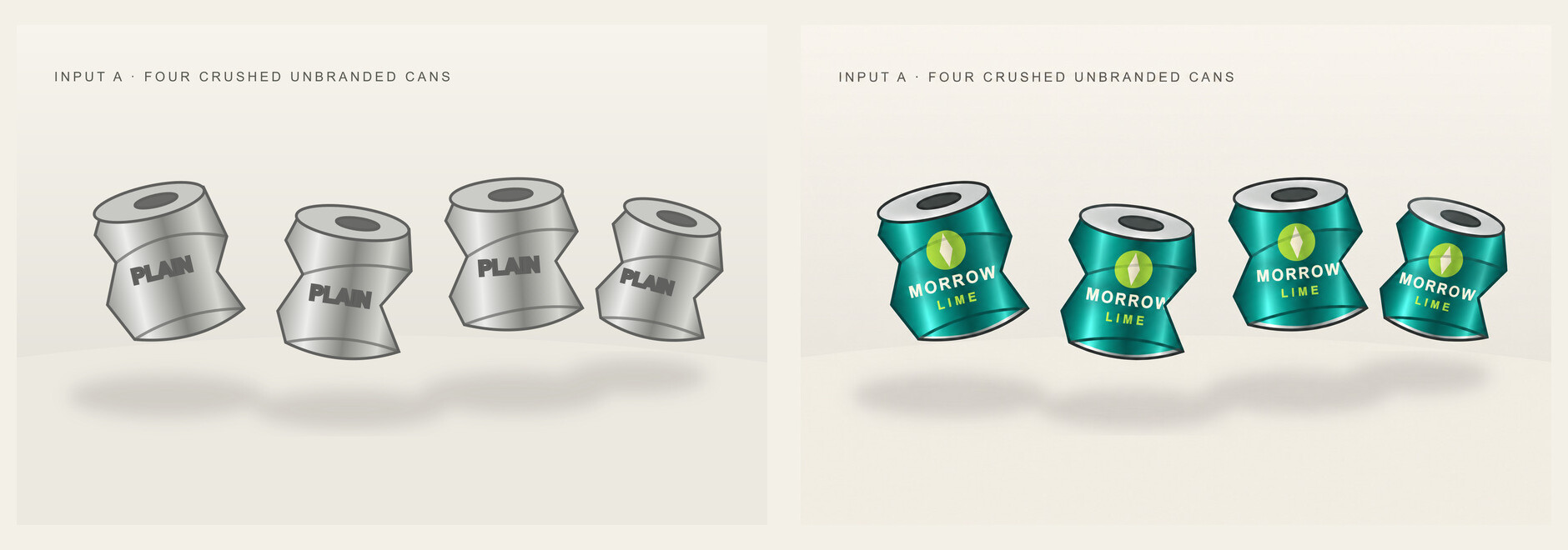
Observed result. The output kept four cans, four different crushed shapes, the white sweep and readable MORROW/LIME labels. The green reflections followed the folds well enough for a concept handoff. It also preserved the source's instructional header, which a production source would normally omit before submission. We accepted the composition and identity test, not pixel equivalence.
Downstream handoff. We cropped only the trace header from the accepted PNG; no generated can pixels were changed. The resulting concept-comp export is shown above and included with the source scene, package reference and untouched output in the evidence pack. A real campaign would still require legal and packaging-claim review.
Case 2 — place a watch without changing the mannequin
Audience and job. A product designer needs a fictional Northline Dial placed on a mannequin wrist while preserving the exact pose, camera, sleeve and neutral plate.
Input preparation. The first 1600×1200 input is a grey mannequin arm with a dashed placement line. The second is a 1200-square watch reference: navy circular face, silver case, navy band and exactly two side buttons. Multi-reference placement was chosen because the product must inherit the plate lighting and wrap naturally.
Model and settings. Seedream 5.0 Pro; 2K; one output. The private preservation Skill was attached. First pass: 1.17 settled credits. One allowed correction: 1.17 credits.
First-pass result. The model kept the mannequin, pose, sleeve and background and placed a plausible watch. It failed product fidelity: it invented extra markers and a third control, and the dashed guide remained visible outside the watch.
Correction prompt. We repeated the image roles, required exactly two rounded buttons, four cardinal ticks and two hands, banned a crown and extra controls, and asked for the full dashed guide to be removed.
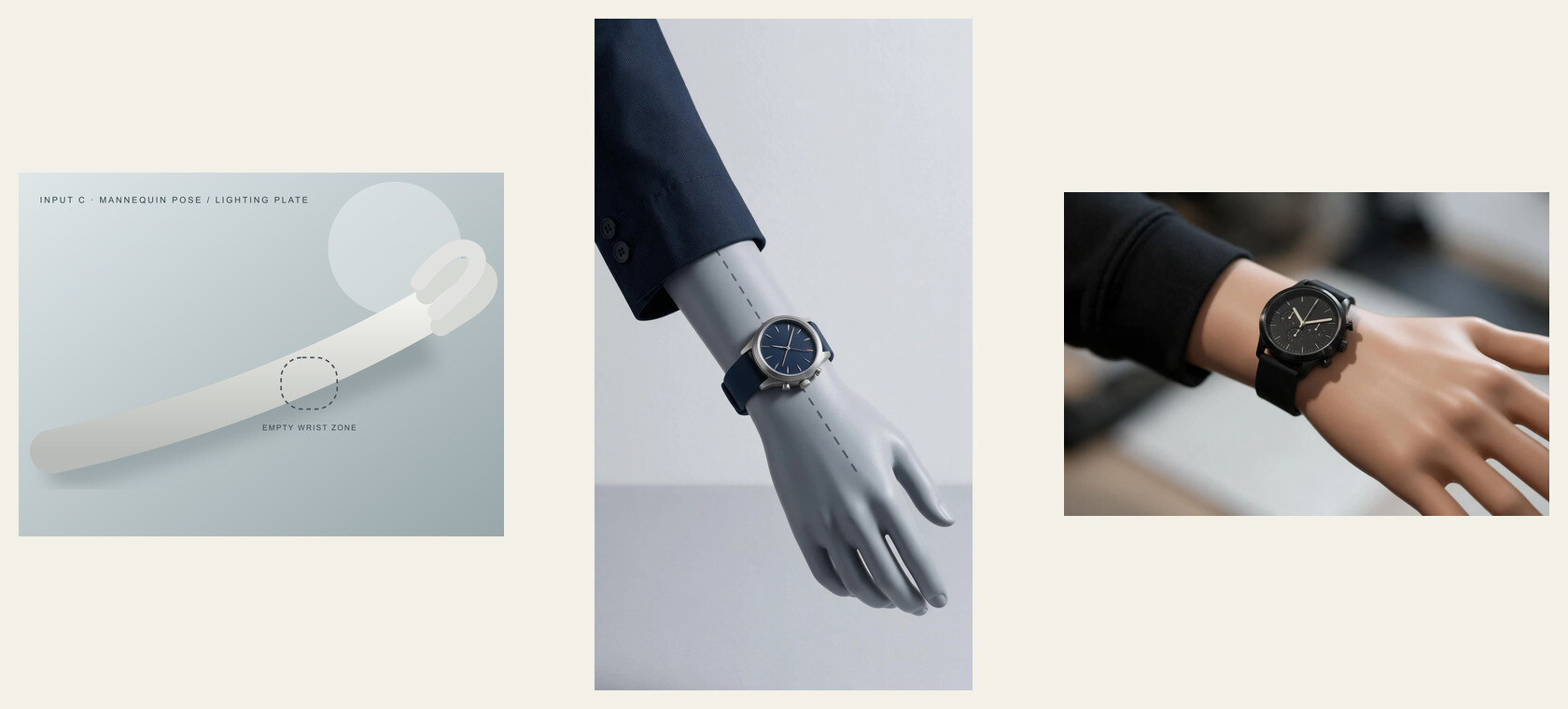
Correction result. It was worse. The guide disappeared, but the mannequin became a human hand, the crop and background changed, and the watch was redesigned again. We rejected it. This is the practical lesson: a more specific second prompt can still trade one failure for a larger one. Do not call that solved; return to the source and use a mask, a layer editor or manual compositing.
Downstream handoff. The first pass is suitable only as a placement reference. We returned to the original vector plate, removed its dashed guide, placed the exact fictional watch drawing at the wrist, aligned the band to the arm and added a contact shadow. That editable SVG and its rendered PNG are the delivery handoff shown above. The two model outputs remain rejected evidence; the manual composite is not presented as an Aixio generation.
Case 3 — remove one poster object while preserving exact text
Audience and job. A poster designer needs one lantern removed without damaging the title, date, venue, tagline, border or surrounding illustration.
Input preparation. We authored a 1200×1500 Night Orchard poster and a separate guide with a narrow pink region around the lantern. A localization guide was chosen over a general instruction because the copy and border were immutable.
Model and settings. Nano Banana 2; 1K; PNG; one output; web search off; reasoning off. The private Skill was attached. The settled charge was 1.04 credits.
Exact prompt. “Use image 1 as the final poster and image 2 only as a localization guide. Remove only the illustrated lantern inside the pink guide region. Reconstruct the dark green paper texture and thin cream grid lines behind it. Preserve every other element and pixel relationship, especially the exact text NIGHT ORCHARD, 17 OCT, MASON HALL, and AUTUMN SOUND + LIGHT; preserve their spelling, spacing, border, colors, crop and dimensions. Do not include the pink guide, dashed outline, replacement object or new text.”
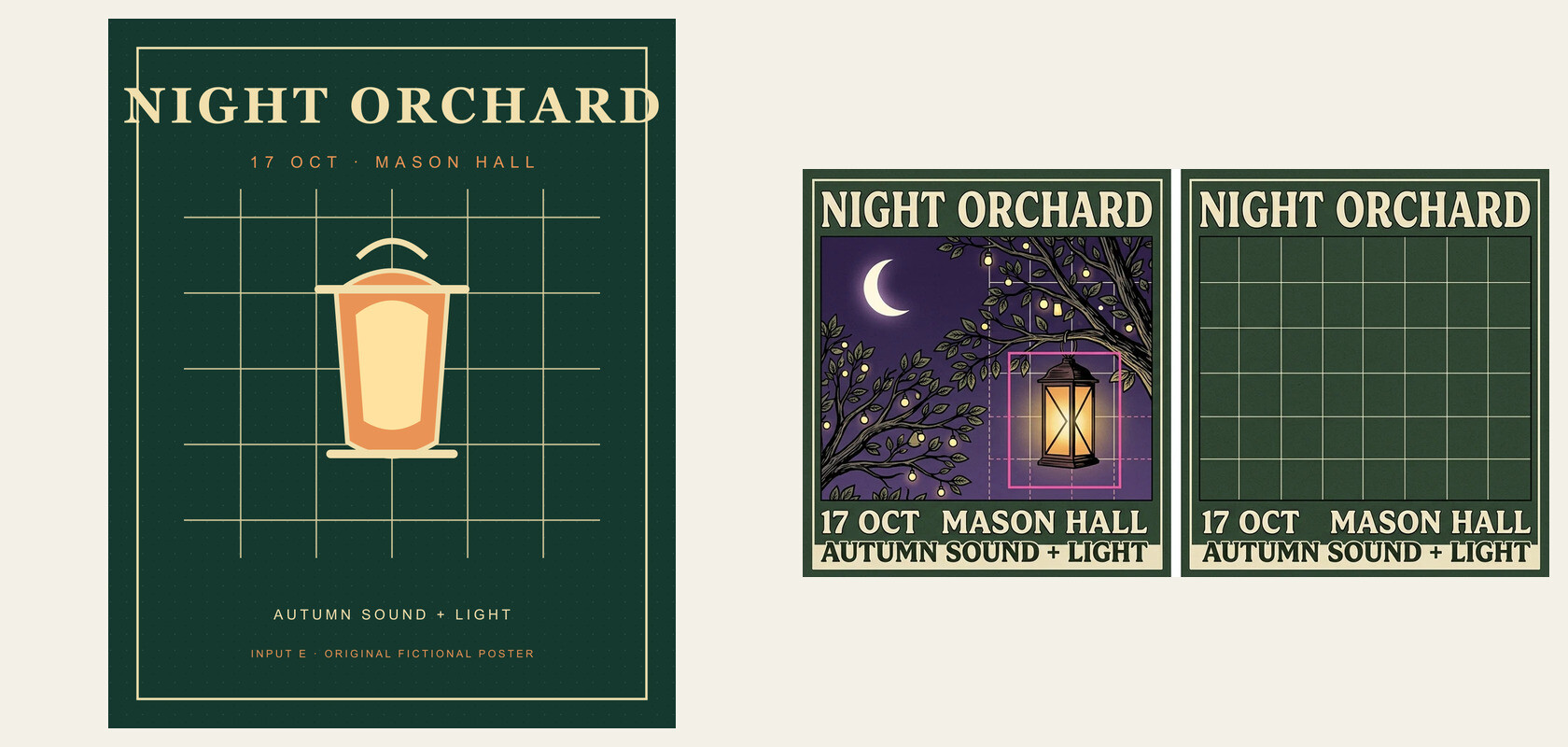
Observed result. The model returned a before/after comparison sheet instead of a final poster. The right panel removed the lantern and kept the visible copy readable, but it erased the entire illustrated middle—moon, branches and lights—not just the bounded object. It failed locality and output-format requirements, so it was rejected.
Downstream handoff. We did not crop the generated comparison sheet and pretend it was the requested edit. We reopened the original vector poster and removed only the lantern group; the pattern, grid, border, exact strings, colors and 1200×1500 dimensions stayed unchanged. The editable SVG and rendered final are in the pack, alongside the rejected model output.
What changed, what transferred and what passed
The job changed in every case: deform a label over crushed geometry, wrap a product around a wrist, then remove a bounded object beside exact typography. The model and settings changed too.
What transferred was the tested Skill and audit contract: source first, reference second, immutable list, one change, forbidden extras, and whole-frame inspection. That method caught failures a pleasant thumbnail would hide. Tested scope is three briefs, four paid submissions and three model families. It is not a benchmark of those models or proof that the Skill enforces constraints server-side.
Only the Morrow package case passed at the model-output stage. Northline's first pass was a useful placement comp but failed exact identity; its correction regressed. Night Orchard preserved copy but failed localization. All three cases now have usable finished handoffs because the rejected cases returned to the locked source for explicit manual finishing. The final package therefore demonstrates both generative speed and the boundary where exact production work should stop prompting.
Cost and evidence
The four settled billing-history charges were 3.514, 1.17, 1.17 and 1.04 credits: 6.894 credits total, below the 9.23-credit hard cap. The single correction allowance was used on Northline. No top-up or fifth submission was made. The visible balance after settlement was 1,375.311 credits, but account-wide balance delta was not used as proof because other activity can occur.
All inputs are original fictional assets. The public pack includes the source PNGs, real outputs, rejected correction, deterministic repair sources, delivery PNGs, exact prompts, model settings, workspace URLs, checksums and the saved-Skill ID. Output dimensions and hashes are recorded; no manual finish is presented as a generated result.
Reuse the recipe
Before submitting, write the acceptance test in plain language. If you cannot describe which pixels or relationships must stay fixed, you cannot audit the result. Use a full-image reference when color and reflections cross object boundaries; use a narrow guide or true mask when locality matters; use manual compositing when an exact product or logo must survive.
Then compare the entire frame at full size and at 50% opacity. Count objects. Read every small word. Check the crop, camera, lighting and untargeted corners. A generated edit is ready only when it passes the job—not when it merely looks good.
Start a preservation edit in Aixio Studio · See the camera-and-lighting series workflow
Sources
The social inspiration and exact creator prompts came from the September 23 post “Qwen Image 2.1 is an EDITING Beast”, retrieved October 7, 2026. The creator recommended explicit image roles and preservation language; commenters reported scale, camera, text, color and pose failures. A separate Qwen 2.1 restoration test, about 50 net votes when retrieved, independently reported contrast, detail and grain drift. These are source observations, not Aixio results.
Primary technique references: Qwen Image 2.1, OpenAI Images API, ByteDance Seedream editing and Google image generation and editing. The immutable-list audit, delivery crop, exact vector composite and vector object removal were actually executed here. A raster inpainting mask remains a recommendation, not a tested fix in this run.
Questions
How do I edit one part of an AI image without changing the rest?
Use the original as the canvas, label every reference's role, list immutable elements, request one bounded change, and compare the whole output against the source. For exact products or text, keep a mask or manual composite fallback.
Does a longer negative prompt guarantee preservation?
No. Our Northline correction was more specific and still caused a larger regression. Constraints make failures easier to detect; they do not guarantee compliance.
Did Aixio produce all three finished images automatically?
No. Aixio produced all three test outputs, but only Morrow passed the written delivery rubric. Northline and Night Orchard were finished manually from the locked vector sources, with the failed generations retained for inspection.
Is the preservation audit an Aixio Skill?
Yes, a private “Only me” Skill was saved and reused on two briefs. It is not public, automated or proven beyond these tests.